Best Home Maintenance Apps for Homeowners

Introduction
Owning a home comes with an endless list of responsibilities. Filters need changing. Gutters need cleaning. The furnace needs servicing. The deck needs sealing. Keeping track of all of it without a system is how small tasks get missed, small problems grow into expensive repairs, and homeowners end up paying far more than they should.
That is exactly where home maintenance apps make a genuine difference. These tools help you organize every maintenance task, set reminders before deadlines pass, log repair histories, track expenses, and store documents all in one place. Instead of relying on memory or scattered sticky notes, you have a clear, centralized system that keeps your home running smoothly.
The market for homeowner maintenance apps has grown significantly in recent years, and the options now range from simple digital checklists to full-featured property management platforms with cloud storage, contractor connections, and appliance tracking. Choosing the right one depends on your specific needs, your home’s complexity, and how hands-on your maintenance approach is.
This guide reviews the best home maintenance apps available today, compares their features and pricing, and gives you the information you need to find the right fit. Whether you manage a single home or multiple properties, there is an app in this list that will make your maintenance routine more organized, more consistent, and more cost-effective.
What Is a Home Maintenance App?
A home maintenance app is a digital tool designed to help homeowners plan, track, and manage the ongoing care of their property. These apps replace paper checklists, spreadsheets, and calendar notes with organized, searchable, and often automated systems that keep maintenance tasks from falling through the cracks.
Most home maintenance apps include some combination of task scheduling, reminder notifications, maintenance checklists, expense tracking, maintenance history logs, and document storage. More advanced platforms also include appliance tracking, contractor directories, home value estimations, and cloud backup for warranties and manuals.
Think of a home maintenance app as a personal property manager that lives in your pocket. It knows when your HVAC filter was last changed, reminds you when it is time for the next one, stores the receipt for the repair you made last spring, and gives you a complete history of everything done to your home.
For homeowners who already follow a structured routine using tools like our Annual Home Maintenance Checklist, a dedicated app transforms that checklist from a static document into a dynamic, trackable system.
Why Every Homeowner Should Use a Home Maintenance App
Most homeowners underestimate how many individual tasks their home requires throughout the year. Between seasonal inspections, monthly checks, appliance servicing, and routine cleaning, the average single-family home has dozens of maintenance tasks that need attention at different intervals.
Without a tracking system, tasks get delayed or forgotten entirely. Deferred maintenance is one of the most reliable ways to turn small problems into large ones. A clogged dryer vent missed for two years becomes a fire hazard. An unserviced HVAC system fails during the hottest week of summer. A gutter clog unnoticed since fall leads to an ice dam that damages the roof.
A home maintenance app eliminates the mental burden of remembering everything. It handles the scheduling, sends reminders when tasks are due, and keeps a log of what has been completed and when. For homeowners who want to stay consistent with their maintenance routine, the app does the organizational work so you can focus on the actual tasks.
Apps also help at resale time. Documented maintenance history gives buyers confidence and can support a stronger asking price. According to the National Association of Realtors, well-maintained homes with documented care records sell faster and at higher values than those without.
Benefits of Home Maintenance Apps
Using a home maintenance app consistently delivers real, measurable advantages.
- Prevents missed tasks by sending automated reminders before deadlines arrive
- Reduces repair costs by catching maintenance gaps early before they escalate
- Creates a complete maintenance history that is useful for insurance claims, resale documentation, and warranty verification
- Simplifies expense tracking by logging repair costs and service payments in one place
- Stores important documents including warranties, manuals, receipts, and inspection reports
- Reduces stress by replacing memory-based task management with a reliable organized system
- Supports resale value by demonstrating a consistent, documented care history to prospective buyers
- Adapts to your home by allowing custom tasks alongside standard seasonal and monthly checklists
How to Choose the Best Home Maintenance App
Not every app fits every homeowner. Before committing to a platform, evaluate it against the following criteria based on your specific needs.
Ease of Use
The most feature-rich app in the world is useless if you find it frustrating to navigate. Look for a clean, intuitive interface that makes adding tasks, checking reminders, and logging completions quick and straightforward. A steep learning curve leads to abandonment, which defeats the entire purpose.
Maintenance Scheduling
The core function of any home maintenance app is scheduling. Look for the ability to set tasks on daily, weekly, monthly, seasonal, and annual frequencies. The best apps come preloaded with common maintenance schedules so you are not starting from scratch.
Reminder Notifications
Push notifications and email reminders are what distinguish an app from a static checklist. Confirm that the app sends reminders at useful intervals, ideally allowing you to set lead time before a task is due so you have time to arrange supplies or contractors.
Checklist Management
A good home maintenance checklist app lets you create, edit, and organize tasks by category, room, season, or priority. The ability to build custom checklists alongside pre-built templates gives you flexibility without requiring you to build everything from zero.
Expense Tracking
Tracking what you spend on maintenance and repairs is valuable for budgeting, tax preparation if you rent the property, and understanding your total cost of homeownership. Look for apps that allow you to log costs, attach receipts, and categorize expenses.
Document Storage
Every home accumulates paperwork. Warranties, appliance manuals, inspection reports, insurance documents, and contractor invoices all need somewhere to live. An app with document storage keeps these organized and accessible from any device.
Cloud Backup
Your maintenance history represents years of data. Confirm that the app stores data in the cloud rather than only on your device. Cloud backup protects your records if a device is lost or replaced and allows access from multiple devices.
Multi-Device Support
The best apps work on both iOS and Android and include web access so you can review your maintenance data from a computer as well as your phone. This is especially important if multiple household members share responsibility for home maintenance tasks.
Free vs Paid Features
Many home maintenance apps offer a free tier with basic features and a paid subscription for advanced capabilities. Evaluate whether the free version meets your needs or whether the paid features justify the cost for your situation.
Best Home Maintenance Apps for Homeowners
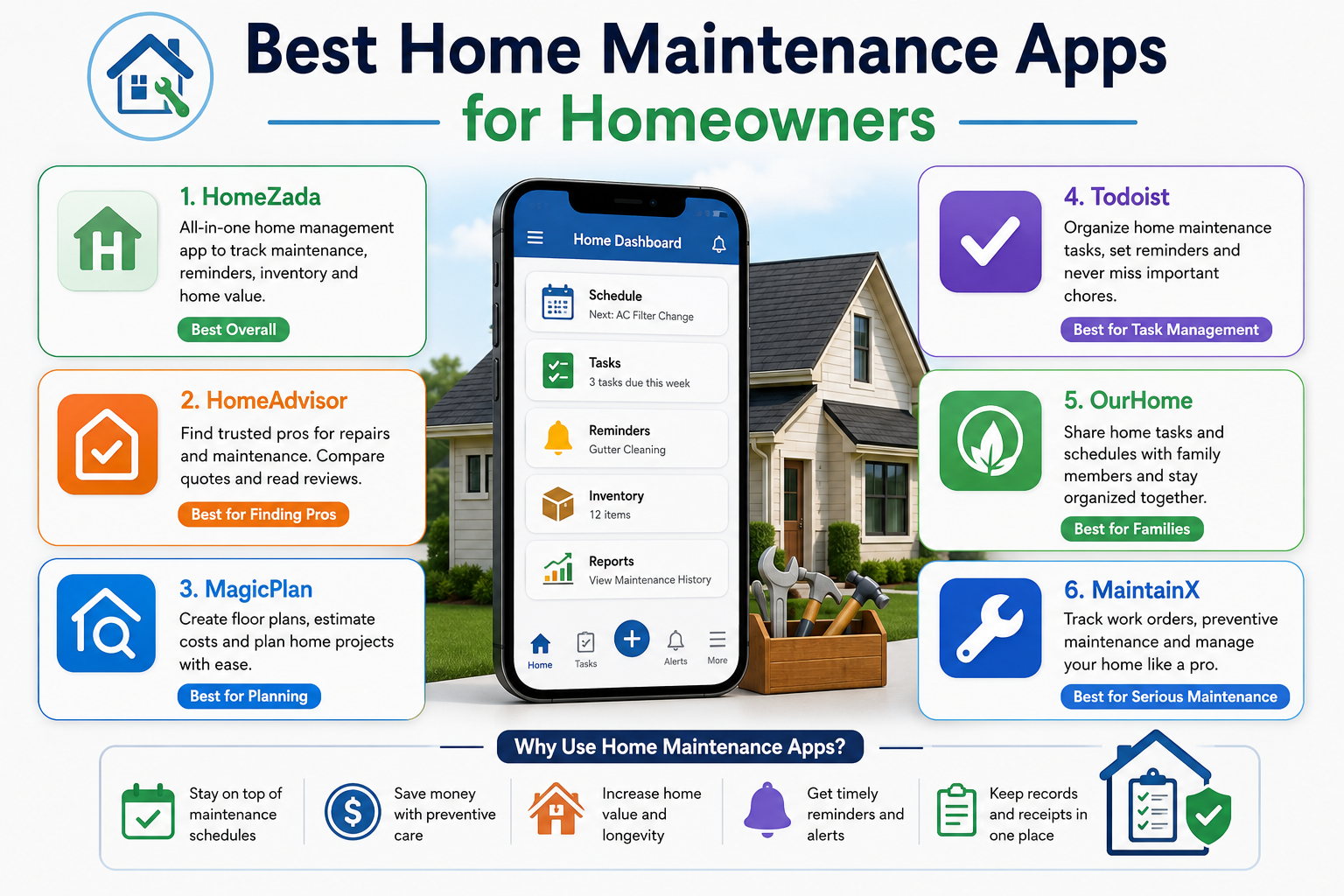
The following apps represent the strongest options currently available. Each serves different homeowner needs, and the right choice depends on what you prioritize most in your maintenance management system.
Centriq
Overview
Centriq is one of the most comprehensive home maintenance apps available, designed specifically around appliance management and maintenance tracking. It allows you to scan the barcode or model number of any appliance and pulls in the owner’s manual, maintenance schedule, recall notices, and replacement parts automatically.
Key Features
- Appliance tracking with automatic manual and recall retrieval
- Maintenance reminders customized to each appliance
- Document and photo storage for the home and its systems
- Contractor directory for finding service professionals
- Home profile builder for organizing all home information
Pros
- Exceptionally strong appliance management capability
- Automatic document retrieval saves significant manual entry time
- Clean, intuitive interface that most users learn quickly
- Useful for tracking warranties and recall notifications
Cons
- Less focus on general home maintenance tasks outside appliances
- Some advanced features require a paid subscription
- Contractor directory is stronger in some regions than others
Best For
Homeowners who want detailed appliance tracking alongside their broader maintenance schedule.
Pricing
Free plan available. Premium subscription approximately $3.99 per month or $29.99 per year.
Platform Availability
iOS and Android.
Overall Rating
4.5 out of 5
HomeZada
Overview
HomeZada is one of the most feature-complete home maintenance and management platforms available. It functions as a full digital home management system that combines maintenance scheduling, home inventory, financial tracking, and project management in a single platform. Visit HomeZada’s official website at homezada.com to explore current plan offerings and features.
Key Features
- Preloaded seasonal maintenance checklists with over 90 standard tasks
- Home inventory tracking for insurance documentation purposes
- Financial dashboard for tracking home value, expenses, and equity
- Project management tools for renovation and improvement projects
- Document and photo storage with cloud backup
- Property sharing for couples or co-owners
Pros
- Among the most comprehensive platforms available for homeowners
- Strong financial tracking and home value monitoring features
- Excellent home inventory tool for insurance claim preparation
- Regular updates and an active support team
Cons
- The breadth of features can feel overwhelming for users who want simplicity
- Full-featured plan requires a paid subscription
- Setup takes meaningful time to populate all home information
Best For
Homeowners who want a complete digital home management platform that goes well beyond basic task reminders.
Pricing
Free plan with limited features. Paid plans start at approximately $9.99 per month.
Platform Availability
iOS, Android, and web browser.
Overall Rating
4.6 out of 5
Thumbtack
Overview
Thumbtack is primarily a contractor and service professional marketplace, but it also serves as a useful home maintenance planning tool. It connects homeowners directly with local professionals for virtually any home maintenance or repair task and provides cost estimates before booking.
Key Features
- Nationwide contractor marketplace with reviews and ratings
- Instant cost estimates for hundreds of home services
- Direct messaging with contractors before hiring
- Project history log for completed services
- Home care recommendations based on home type and location
Pros
- Excellent for finding and comparing local contractors quickly
- Transparent pricing estimates reduce cost surprises
- Strong review system helps evaluate contractor quality
- Useful as a complement to other maintenance tracking apps
Cons
- Not a maintenance tracking or scheduling app in the traditional sense
- Value depends heavily on contractor availability in your specific area
- No built-in maintenance checklist or reminder system
Best For
Homeowners who frequently hire professionals and want a reliable way to find, compare, and book local contractors.
Pricing
Free to use for homeowners.
Platform Availability
iOS, Android, and web browser.
Overall Rating
4.2 out of 5
Houzz
Overview
Houzz is best known as a home design and renovation inspiration platform, but it also offers useful tools for homeowners planning improvement projects. It combines a visual idea board with a contractor directory, product marketplace, and project organization features.
Key Features
- Massive library of home design photos for inspiration
- Contractor directory with reviews and portfolio photos
- Product marketplace for sourcing materials and fixtures
- Project management tools for renovation planning
- Idea boards for organizing design concepts by room
Pros
- Exceptional visual design resource alongside project planning tools
- Strong contractor marketplace with detailed profiles
- Useful for planning improvements that complement maintenance work
- Free access to core features
Cons
- Not designed as a maintenance scheduling or tracking tool
- Better suited for improvement projects than routine maintenance tasks
- Can be a distraction from practical maintenance planning
Best For
Homeowners planning renovation or improvement projects who want inspiration, contractor connections, and project organization in one place.
Pricing
Free with optional premium features.
Platform Availability
iOS, Android, and web browser.
Overall Rating
4.1 out of 5
BrightNest
Overview
BrightNest is a straightforward home maintenance app designed around personalized task recommendations. After answering a few questions about your home, the app builds a customized maintenance schedule with reminders tailored to your specific property type, location, and priorities.
Key Features
- Personalized maintenance plan based on home characteristics
- Weekly and monthly task recommendations
- Home care tips and how-to guides for each task
- Reminder notifications for scheduled tasks
- Clean, beginner-friendly interface
Pros
- Excellent starting point for new homeowners who are unfamiliar with maintenance requirements
- Personalized recommendations reduce the guesswork of building a schedule from scratch
- Simple interface that does not overwhelm users with features
- Educational content helps homeowners understand why each task matters
Cons
- Limited customization for experienced homeowners with specific needs
- Fewer advanced features than comprehensive platforms like HomeZada
- Some content areas have not been updated recently
Best For
First-time homeowners and beginners who want a guided, personalized introduction to home maintenance scheduling.
Pricing
Free.
Platform Availability
iOS and Android.
Overall Rating
4.0 out of 5
Taskbird
Overview
Taskbird is a task and project management app that works well as a home maintenance organizer when configured for residential use. It offers flexible list creation, deadline setting, recurring task scheduling, and team sharing, making it useful for households where multiple people share maintenance responsibilities.
Key Features
- Flexible task and project management with recurring schedule options
- Shared lists for household collaboration on maintenance tasks
- Priority ranking and deadline tracking
- Notes and attachment capability for each task
- Clean cross-platform interface
Pros
- Highly flexible for creating any type of maintenance schedule
- Excellent for households sharing responsibilities across multiple people
- Recurring task feature works well for monthly and seasonal maintenance
- Available across multiple platforms with reliable sync
Cons
- Not home-specific, so there are no preloaded maintenance checklists
- Requires more manual setup than purpose-built home maintenance apps
- No appliance tracking or document management features
Best For
Households where multiple people share maintenance responsibilities and want a collaborative task management system.
Pricing
Free plan available. Premium from approximately $3 per month.
Platform Availability
iOS, Android, and web browser.
Overall Rating
3.9 out of 5
iHomeMaintenance
Overview
iHomeMaintenance is a purpose-built home maintenance tracking app focused on maintenance history logging, task scheduling, and reminder management. It is designed specifically for homeowners who want a dedicated maintenance record system rather than a broad property management platform.
Key Features
- Maintenance history log with date and cost recording
- Task scheduling with recurring reminder options
- Multiple property support
- Custom task creation alongside preloaded suggestions
- Simple data entry interface
Pros
- Purpose-built for maintenance logging rather than general property management
- Multiple property support is useful for landlords and investors
- Straightforward interface with minimal learning curve
- Reliable reminder system
Cons
- Limited design and interface compared to newer apps
- No cloud backup on the basic version
- Fewer integrations than modern platforms
Best For
Landlords and property owners managing multiple properties who need a straightforward maintenance log and scheduling system.
Pricing
One-time purchase approximately $2.99.
Platform Availability
iOS.
Overall Rating
3.8 out of 5
Plowz and Mowz
Overview
Plowz and Mowz is a specialized property care app focused on outdoor and lawn maintenance services. It connects homeowners with local service providers for lawn mowing, snow removal, leaf cleanup, and other exterior property care needs. It is a seasonal service booking platform rather than a traditional home maintenance tracker.
Key Features
- On-demand booking for lawn care and snow removal services
- Real-time service tracking after booking
- Automatic scheduling for recurring outdoor maintenance
- Service history and payment records
- Coverage in hundreds of cities across the United States
Pros
- Extremely convenient for outsourcing routine outdoor tasks
- On-demand booking with same-day service availability in many areas
- Useful complement to a broader home maintenance app
- Transparent pricing before booking
Cons
- Limited to outdoor service booking with no interior maintenance features
- Service availability varies significantly by region
- Not a substitute for a comprehensive home maintenance planning app
Best For
Homeowners who want to outsource routine outdoor property care rather than managing it themselves.
Pricing
Free to download. Pay-per-service pricing varies by task and location.
Platform Availability
iOS and Android.
Overall Rating
4.0 out of 5
Home Routine
Overview
Home Routine is a cleaning and household task management app that works well as a complementary tool to a dedicated maintenance tracker. It organizes cleaning tasks by room and frequency, helping homeowners build consistent daily and weekly cleaning habits alongside their broader maintenance schedule.
Key Features
- Room-by-room task organization for cleaning and household duties
- Daily, weekly, and monthly task frequency settings
- Visual progress tracking with completion indicators
- Custom task creation for any household routine
- Simple, color-coded interface
Pros
- Excellent for integrating cleaning routines with maintenance schedules
- Visual progress indicators keep users motivated
- Customizable to fit any household routine
- Lightweight and easy to use
Cons
- Focused on cleaning rather than structural or mechanical maintenance
- No expense tracking or document storage
- Better used as a complement to a dedicated maintenance app
Best For
Homeowners who want to integrate regular cleaning schedules with their broader maintenance planning system.
Pricing
Free with optional in-app purchases.
Platform Availability
iOS.
Overall Rating
3.9 out of 5
Notion
Overview
Notion is a highly versatile productivity platform that many homeowners use as a customizable home maintenance management system. With the right template, it becomes a powerful maintenance tracker, document organizer, expense log, and project manager combined in a single flexible workspace.
Key Features
- Fully customizable databases, tables, and task boards
- Recurring task scheduling with reminders
- Document and image storage within pages
- Shareable workspaces for household collaboration
- Template library including home maintenance options
- Cross-platform with reliable cloud sync
Pros
- Virtually unlimited customization for any maintenance workflow
- Excellent document and image storage capability
- Strong collaboration tools for shared households
- Free plan includes most useful features
Cons
- Requires significant setup time to configure for home maintenance use
- Learning curve is steeper than purpose-built home apps
- No preloaded home-specific maintenance schedules without a template
Best For
Tech-savvy homeowners who want a fully customizable maintenance management system and are willing to invest time in initial setup.
Pricing
Free plan available. Plus plan approximately $10 per month.
Platform Availability
iOS, Android, and web browser.
Overall Rating
4.3 out of 5
OurHome
Overview
OurHome is a family task and chore management app that works well as a shared home maintenance organizer for households with multiple members contributing to upkeep. It includes task assignment, deadline tracking, shared lists, and a reward system designed to encourage participation from all family members including children.
Key Features
- Shared household task management with individual assignments
- Deadline setting and reminder notifications
- Reward point system for completed tasks
- Grocery and shopping list integration
- Cross-platform sync for the entire household
Pros
- Excellent for distributing maintenance responsibilities across family members
- Reward system encourages participation from younger household members
- Simple, family-friendly interface
- Free with generous feature set
Cons
- Not designed specifically for home maintenance or property management
- No expense tracking or document storage capabilities
- Limited maintenance-specific features
Best For
Families with children who want to involve all household members in home maintenance responsibilities using a shared task system.
Pricing
Free.
Platform Availability
iOS and Android.
Overall Rating
3.8 out of 5
HouseLogic
Overview
HouseLogic is a free web-based resource from the National Association of Realtors that combines home maintenance guides, a maintenance checklist tool, and financial calculators in a single platform. It is particularly strong for understanding how maintenance decisions affect home value and resale appeal. Visit HouseLogic at houselogic.com to access their free maintenance planning tools and home value resources.
Key Features
- Seasonal maintenance checklists organized by home area
- Home value and equity monitoring tools
- Financial calculators for remodeling ROI
- Extensive library of maintenance how-to articles
- Tax deduction guidance for home-related expenses
Pros
- Completely free with no premium tier
- Backed by the National Association of Realtors for credibility
- Excellent financial and value-focused perspective on maintenance decisions
- Strong educational content alongside practical checklists
Cons
- Web-based with no dedicated mobile app
- Task reminder functionality is limited compared to dedicated apps
- Less useful for logging and tracking completed maintenance history
Best For
Homeowners focused on understanding the financial impact of maintenance decisions and their effect on property value.
Pricing
Free.
Platform Availability
Web browser only.
Overall Rating
4.1 out of 5
Todoist
Overview
Todoist is a widely used productivity and task management app that many homeowners adapt for maintenance scheduling. Its strong recurring task system, project organization, and cross-platform reliability make it a practical choice for homeowners who already use it for personal productivity and want to add home maintenance tracking.
Key Features
- Recurring task scheduling with flexible frequency options
- Project-based organization for grouping maintenance areas
- Priority levels and deadline management
- Shared projects for household collaboration
- Integration with calendar, email, and smart home platforms
Pros
- Excellent recurring task system with natural language scheduling
- Highly reliable with strong cross-platform sync
- Integrates with calendars and other productivity tools
- Clean interface with minimal learning curve
Cons
- Not home-specific, requiring manual setup of maintenance tasks
- No document storage or appliance tracking
- Full feature set requires a paid subscription
Best For
Homeowners already using Todoist for personal productivity who want to add maintenance scheduling without adopting a separate app.
Pricing
Free plan available. Pro plan approximately $4 per month billed annually.
Platform Availability
iOS, Android, and web browser.
Overall Rating
4.2 out of 5
Free vs Paid Home Maintenance Apps
| App | Free Plan | Paid Plan Cost | What Paid Adds |
|---|---|---|---|
| Centriq | Yes | $3.99/month | Full appliance management, advanced storage |
| HomeZada | Yes (limited) | From $9.99/month | Full checklists, financial tools, inventory |
| BrightNest | Yes (full) | N/A | No paid tier |
| Thumbtack | Yes (full) | N/A | No subscription for homeowners |
| Notion | Yes | $10/month | Team features, advanced integrations |
| Todoist | Yes | $4/month | Reminders, labels, advanced filters |
| Houzz | Yes | Optional upgrades | Design tools and contractor features |
| OurHome | Yes (full) | N/A | No paid tier |
| HouseLogic | Yes (full) | N/A | No paid tier |
| iHomeMaintenance | One-time $2.99 | N/A | Full access on purchase |
| Taskbird | Yes | From $3/month | Team features, advanced management |
| Plowz and Mowz | Free (pay per service) | N/A | Pay per booking |
Home Maintenance Apps Comparison
| App Name | Platform | Free Plan | Price | Best Features | Best For | Rating |
|---|---|---|---|---|---|---|
| Centriq | iOS, Android | Yes | $3.99/mo | Appliance tracking, document retrieval | Appliance-focused homeowners | 4.5/5 |
| HomeZada | iOS, Android, Web | Limited | $9.99/mo | Full property management, inventory | Comprehensive home management | 4.6/5 |
| BrightNest | iOS, Android | Yes | Free | Personalized schedules, how-to guides | First-time homeowners | 4.0/5 |
| Thumbtack | iOS, Android, Web | Yes | Free | Contractor marketplace, cost estimates | Hiring local professionals | 4.2/5 |
| Houzz | iOS, Android, Web | Yes | Free | Design inspiration, contractor profiles | Improvement and renovation planning | 4.1/5 |
| Notion | iOS, Android, Web | Yes | $10/mo | Fully customizable, document storage | Tech-savvy, custom workflows | 4.3/5 |
| Todoist | iOS, Android, Web | Yes | $4/mo | Recurring tasks, calendar integration | Productivity app users | 4.2/5 |
| OurHome | iOS, Android | Yes | Free | Shared family tasks, reward system | Families with children | 3.8/5 |
| HouseLogic | Web only | Yes | Free | Financial tools, NAR-backed content | Value-focused homeowners | 4.1/5 |
| iHomeMaintenance | iOS | One-time | $2.99 | Maintenance log, multi-property | Landlords, property managers | 3.8/5 |
| Taskbird | iOS, Android, Web | Yes | $3/mo | Collaborative task management | Shared-responsibility households | 3.9/5 |
| Home Routine | iOS | Yes | Free | Room-by-room cleaning integration | Cleaning and maintenance combo | 3.9/5 |
| Plowz and Mowz | iOS, Android | Free/booking | Per service | On-demand outdoor services | Outsourcing outdoor tasks | 4.0/5 |
How to Use a Home Maintenance App Effectively
Downloading an app is only the first step. Getting consistent value from it requires deliberate setup and regular use.
Start with a home profile. Enter your home’s basic information including square footage, age, roof type, HVAC system, appliances, and any recent major repairs. The more complete your home profile, the more relevant and accurate the app’s recommendations will be.
Import or build your initial checklist. Use the app’s preloaded templates as a starting point, then customize based on your specific home. Add tasks that reflect your local climate, your home’s age and systems, and any known maintenance history from previous years. Our Monthly Home Maintenance Checklist provides a strong foundation for what to include.
Set reminders with enough lead time. A reminder that arrives the day a task is due rarely allows time to gather supplies or book a contractor. Set reminders at least one to two weeks ahead for tasks that require preparation or professional scheduling.
Log every completed task immediately. The maintenance history log is one of the most valuable features of any home maintenance tracker. Record the date, what was done, any products or parts used, and the cost. This data is invaluable during insurance claims, contractor conversations, and property sales.
Photograph as you go. Most apps support photo attachments. Photograph your roof, foundation, HVAC equipment, and any repair areas at least annually. Visual documentation of your home’s condition over time is powerful evidence of consistent care.
Review the schedule at the start of each season. Each season brings a different set of priorities. Review your upcoming tasks at the beginning of spring, summer, fall, and winter to confirm everything is scheduled and that supplies or service appointments are arranged in advance. Our Spring Home Maintenance Checklist is a useful companion resource for this seasonal review.
Common Mistakes When Using Home Maintenance Apps
Even with the right app, certain habits undermine its effectiveness.
Incomplete home setup. Skipping the initial home profile setup means the app cannot provide relevant recommendations. Take the time to enter complete information at the start.
Ignoring reminders. Dismissing notifications without completing or rescheduling the task defeats the purpose entirely. Treat maintenance reminders with the same seriousness as any other calendar commitment.
Not logging completed tasks. Many homeowners mark tasks complete but do not log the details. Without date, cost, and notes, the maintenance history becomes far less useful for future reference.
Using too many apps simultaneously. Splitting maintenance tracking across three or four different tools creates confusion rather than clarity. Choose one primary app and use it consistently.
Expecting the app to do the maintenance. An app organizes and reminds. It does not replace the actual work. The value comes from consistently acting on what the app tells you to do.
Not updating the home profile after major changes. If you replace your water heater, re-roof the home, or install a new HVAC system, update the app immediately. Outdated home information produces inaccurate maintenance schedules.
Tips to Keep Your Home Maintenance Schedule Organized
These practical habits help you get the most from any home maintenance app or planning system.
- Review your complete maintenance schedule at the start of each season and confirm all upcoming tasks are accounted for
- Group tasks by zone or system when possible so you can complete related items during a single session rather than making multiple separate trips
- Book professional service appointments at least four to six weeks in advance during peak seasons when contractors are heavily scheduled
- Keep a running list of supplies needed for upcoming tasks so you can purchase them in a single shopping trip
- Share your maintenance app with your partner or household members so responsibilities are distributed and visible to everyone
- Connect your maintenance schedule to your broader home care plan using resources like our Annual Home Maintenance Checklist for a complete framework
- Set a monthly five-minute review where you check what was completed, what is coming up, and whether any tasks need rescheduling
Are Home Maintenance Apps Worth It?
For most homeowners, the answer is clearly yes. The question is really which app provides the right value for your specific situation.
Free apps like BrightNest, OurHome, and HouseLogic deliver genuine value at zero cost. For homeowners with straightforward maintenance needs and no desire to track expenses or store documents extensively, a free app covers the essential scheduling and reminder functions effectively.
Paid platforms like HomeZada justify their subscription cost for homeowners who want a comprehensive property management system with financial tracking, home inventory, and cloud document storage. For homeowners managing multiple properties, a paid platform provides professional-grade organization that saves significant time and prevents costly oversights.
The cost of the best paid home maintenance apps is typically less than $100 per year. When measured against the average home repair cost of several hundred to several thousand dollars for a problem that routine maintenance would have prevented, even the premium options pay for themselves many times over.
For homeowners who follow a structured approach using resources like our DIY Home Inspection Checklist and want to translate that structure into a digital system, a maintenance app is the natural next step.
Expert Recommendations
After evaluating these platforms across different homeowner needs and scenarios, a few consistent recommendations emerge.
For first-time homeowners, start with BrightNest. It requires minimal setup, provides personalized guidance, and teaches you what maintenance your home actually needs without overwhelming you with features. As you grow more comfortable with your home’s systems, you can transition to a more comprehensive platform.
For experienced homeowners who want comprehensive management, HomeZada offers the most complete feature set available in a single platform. The setup investment is meaningful, but the resulting system covers maintenance scheduling, home inventory, financial tracking, and document storage in a way that no other app matches.
For tech-savvy homeowners who prefer customization, Notion combined with a quality home maintenance template offers the most flexible system available. You control exactly what it tracks, how it is organized, and how it reminds you.
For households managing multiple properties, iHomeMaintenance provides a straightforward multi-property maintenance log at a one-time low cost that outperforms more complex platforms for this specific use case.
Regardless of which app you choose, pair it with a solid seasonal maintenance plan. The combination of a quality app and a structured checklist like our Home Plumbing Maintenance guide or the comprehensive frameworks in our Ultimate Home Maintenance Checklist for Every Season gives you both the organizational system and the content knowledge to maintain your home effectively year-round.
Frequently Asked Questions
What is the best home maintenance app for first-time homeowners?
BrightNest is the strongest choice for first-time homeowners because it builds a personalized maintenance schedule based on your specific home characteristics rather than presenting a generic list of tasks. The app explains why each task matters, which helps new homeowners understand their property rather than just completing tasks blindly. Its simple interface has a very gentle learning curve, making it accessible even for homeowners who have never followed a structured maintenance routine before. It is completely free, which removes any financial barrier. As your comfort with home maintenance grows, you can add more comprehensive tools alongside it.
Do home maintenance apps work for rental properties?
Yes, several apps handle rental properties well. iHomeMaintenance supports multiple property profiles, making it practical for landlords tracking maintenance across several units. HomeZada also supports multiple properties and adds financial tracking that is useful for rental property expense documentation. Notion works particularly well for landlords who want to create customized tracking systems for each property. For property managers with larger portfolios, purpose-built property management platforms like Buildium or AppFolio may be more appropriate than consumer-focused home maintenance apps, as they include tenant management and lease tracking alongside maintenance scheduling.
Can home maintenance apps help with insurance claims?
Yes, this is one of the most underappreciated benefits of consistent maintenance app use. When you log every inspection, repair, and service in a maintenance tracker with dates, costs, and photo documentation, you create a detailed maintenance history that is valuable during insurance claims. If water damage occurs, for example, you can demonstrate that gutters were cleaned and roof inspections were completed on schedule, which supports your claim and may counter any insurer argument about negligence. The maintenance history also helps establish the pre-damage condition of affected systems and components.
How often should I update my home maintenance app?
Update your app immediately after completing any maintenance task rather than waiting to batch updates. Real-time logging captures accurate dates, costs, and details that become harder to remember if you delay entry. Review your upcoming schedule at the start of each season to confirm tasks are properly queued and that professional appointments are booked with appropriate lead time. Update your home profile whenever a major change occurs, such as a roof replacement, new appliance installation, or significant renovation. Keeping the home profile current ensures that the app’s recommendations remain relevant to your actual home.
Are paid home maintenance apps worth the cost?
For most homeowners, yes. The best paid apps cost between $3 and $10 per month, which amounts to $36 to $120 per year. When you consider that a single missed maintenance task, such as a neglected water heater or an unserviced HVAC system, can result in repair or replacement costs of hundreds to thousands of dollars, the subscription cost becomes trivial by comparison. Paid apps typically add meaningful features including cloud document storage, home inventory, financial tracking, and more comprehensive scheduling tools. Evaluate whether those specific features address real needs in your home management routine before subscribing.
What should I store in my home maintenance app?
Start with your home’s basic profile, including square footage, age, roof type, foundation type, HVAC system specifications, and major appliance model numbers. Store digital copies of all appliance warranties, owner’s manuals, and receipts for major purchases. Upload inspection reports, contractor invoices, and insurance documents. Keep photos of your roof, foundation, exterior walls, and mechanical systems dated annually so you have a visual baseline for comparison over time. Log every completed maintenance task with the date, description, products or parts used, and cost. This combined record becomes an invaluable reference document for contractors, insurance adjusters, and future buyers.
Can I use a regular task app instead of a dedicated home maintenance app?
Yes, and many homeowners do this successfully using apps like Todoist, Notion, or even a well-organized calendar. The advantage of a general task app is flexibility and the ability to integrate home maintenance into your existing productivity workflow. The trade-off is that you must build all task templates, schedules, and categories from scratch without the preloaded home-specific content that purpose-built apps provide. General apps also typically lack features like appliance tracking, document storage specific to home records, or home value monitoring. For homeowners who are already committed to a general task management system, adapting it for maintenance is a practical approach.
How do home maintenance apps handle seasonal task reminders?
Most dedicated home maintenance apps come preloaded with seasonal maintenance schedules that trigger automatically based on the current month or time of year. You can typically customize the timing of these reminders to reflect your specific climate, local frost dates, or contractor availability. Apps like HomeZada and BrightNest organize tasks by season and send advance notifications before seasonal tasks are due. More general apps like Todoist allow you to set seasonal recurring tasks manually using date-based recurring rules. The key is setting reminder lead times appropriately, at least one to two weeks ahead for tasks requiring contractor scheduling or supply purchasing.
What is the difference between a home maintenance app and a home inventory app?
A home maintenance app focuses primarily on scheduling, tracking, and reminding you about maintenance tasks. A home inventory app focuses on documenting your possessions, their values, and their condition for insurance and personal record-keeping purposes. Several apps, including HomeZada and Centriq, combine both functions within a single platform. If you are choosing between the two, a maintenance app delivers more ongoing practical value for day-to-day home care. A home inventory, while less frequently used, becomes critically important after a theft, fire, or major weather event when insurance documentation is needed quickly and accurately.
Do home maintenance apps track home value?
Some do. HomeZada includes a home value monitoring feature that tracks your property’s estimated value alongside your equity and the costs you have invested in maintenance and improvements. HouseLogic, backed by the National Association of Realtors, provides financial calculators that help you understand how specific maintenance decisions and improvements affect your home’s value and resale appeal. General maintenance tracking apps like BrightNest and Centriq do not include home value monitoring. If tracking your property’s financial performance alongside your maintenance schedule is important to you, HomeZada or HouseLogic are the strongest options for combining both functions.
Conclusion
Staying on top of home maintenance is one of the most financially sound habits a homeowner can develop. The problem has never been knowing that maintenance matters. The challenge is staying organized, remembering what needs attention and when, and keeping consistent records across dozens of different tasks and systems throughout the year.
Home maintenance apps solve that organizational challenge. They handle the scheduling, send the reminders, store the records, and give you a clear picture of your home’s maintenance history at any moment. The right app transforms a chaotic collection of seasonal tasks into a manageable, trackable, and consistent routine.
No single app is the best choice for every homeowner. First-time homeowners benefit most from the guided simplicity of BrightNest. Experienced homeowners who want comprehensive management will find the most value in HomeZada. Tech-savvy homeowners who want full customization should explore what is possible in Notion with the right template. Landlords with multiple properties will appreciate iHomeMaintenance’s straightforward multi-property tracking.
Whatever you choose, use it consistently. Log every task you complete, store every document you receive, and act on every reminder the app sends. A maintenance app is only as valuable as the habits you build around it.
Your home is likely the largest investment you will ever make. A few dollars per month and a few minutes of regular attention is a small price for the organized, proactive care that protects it.